

Kwikset Home Connect 620 Smart Lock Deadbolt with Z-Wave
Original price was: $149.00.$125.72Current price is: $125.72.
Product Overview
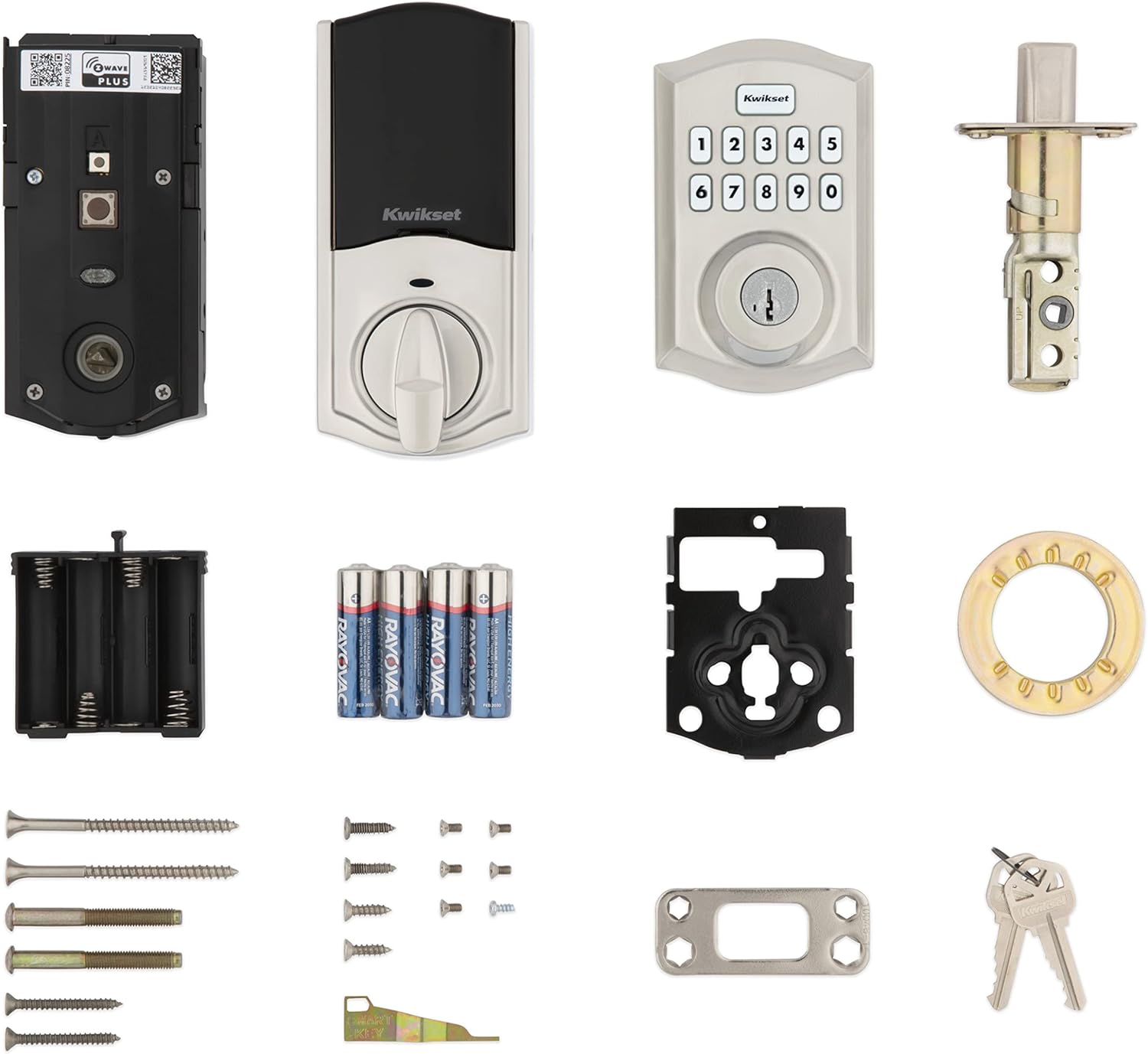
The Kwikset Home Connect 620 Smart Lock Deadbolt with Z-Wave combines modern convenience with reliable security, offering homeowners a seamless transition to keyless entry. This single-cylinder electronic deadbolt is designed to integrate smoothly into smart home environments, supporting both local and remote access through familiar platforms like Ring Alarm and Amazon Alexa. With its sleek Satin Nickel finish and durable construction, the lock delivers on both form and function—making it a practical upgrade for front doors, back entrances, or interior rooms requiring secure, easy-to-use locking mechanisms.
Powered by batteries (not included), the Home Connect 620 operates via a responsive touchpad keypad that allows users to enter personalized access codes from outside the home. Inside, a simple turn button provides manual override control, ensuring you’re never locked out due to power failure or system glitches. The lock also includes a physical key backup option for emergencies, giving peace of mind alongside digital convenience.
Key Features
- Keyless Entry via Touch Keypad: Enter your unique code to unlock the door without needing keys—ideal for quick access during daily routines or unexpected situations.
- Interior Turn Button: A manually operated button inside the lock enables fast locking or unlocking from within, useful for children, pets, or temporary access control.
- Z-Wave Smart Home Integration: Seamlessly connects with Z-Wave-compatible hubs and ecosystems, allowing automation, status monitoring, and scene integration across your connected devices.
- Ring Alarm & Alexa Compatibility: Quick pairing with Ring Alarm systems enables automated arming/disarming routines, while Alexa voice commands allow hands-free lock control—perfect for when your hands are full or you’re relaxing at home.
- Satin Nickel Finish: Offers a polished, contemporary look that resists smudges and complements a wide range of architectural styles, from modern minimalist to classic transitional.
- Durable Motorized Performance: Built with a robust motor system that consistently delivers smooth operation, backed by customer feedback highlighting strong build quality and long-term reliability.
Technical Specifications
- Lock Type: Single Cylinder Electronic Deadbolt
- Finish: Satin Nickel
- Entry Methods:
- Keypad (keyless entry)
- Physical key (external override)
- Interior turn button (manual control)
- Smart Connectivity: Z-Wave (for hub-based automation), Ring Alarm, Amazon Alexa
- Power Requirements: Four AA batteries (not included); low-battery warnings alert users before performance is affected
- Backlit Keypad: Illuminates in low-light conditions for easier nighttime use
- Door Compatibility: Designed for standard residential doors; verify thickness and borehole alignment before installation
Benefits & Use Cases
This smart lock is particularly well-suited for households looking to reduce reliance on traditional keys while enhancing security and accessibility. The keypad eliminates fumbling for keys when carrying groceries, strolling with kids, or returning late at night—offering a hassle-free entry experience. Remote control via smartphone app (through compatible hubs) means you can lock your door from anywhere, check its status, or grant virtual access to trusted individuals, all contributing to greater peace of mind.
For families with children or frequent visitors, programming multiple user codes allows shared access without distributing physical keys. Coupled with Alexa voice commands such as “Alexa, lock the front door,” the lock supports intuitive daily routines and emergency preparedness. Homeowners invested in broader smart home setups will appreciate how Z-Wave connectivity lets the lock participate in automated scenarios—like turning off lights and securing entry points when leaving home—without requiring additional gateways or bridges.
The inclusion of an interior turn button ensures usability even if battery power runs low or wireless signals are disrupted. Combined with a mechanical key fallback, this redundancy makes the Home Connect 620 resilient against common smart device failures. Many customers highlight the clean aesthetic of the Satin Nickel finish as a standout feature, noting that it enhances the visual appeal of both interior and exterior doors without clashing with surrounding hardware.
Installation typically requires basic tools and may involve drilling if existing deadbolt hardware doesn’t align perfectly with the new unit. While professional installation isn’t mandatory, those unfamiliar with door hardware mechanics may benefit from assistance to ensure proper alignment and sealing against weather elements.
Important Notes
Please note that batteries are not included and must be purchased separately prior to installation. It’s recommended to use high-quality alkaline AA batteries for optimal longevity and consistent performance. Always test all functions—including keypad response, interior button operation, and key override—after setup to confirm proper functionality.
While the majority of users report satisfaction with the lock’s appearance and build quality, experiences with connectivity stability, app responsiveness, and long-term durability vary. Before purchasing, verify compatibility with your existing Z-Wave hub (such as Samsung SmartThings, Hubitat, or Aeotec) and ensure your Ring Alarm system is running the latest firmware. Confirm door dimensions fall within the manufacturer’s specifications to avoid fit issues.
As with any smart lock, maintaining at least one physical key as a backup is strongly advised. In case of power loss, system errors, or forgotten codes, this ensures you retain access to your home. Regular maintenance—including cleaning the keypad surface and checking battery levels—can help sustain peak performance over time.
This product ships directly from the manufacturer and may include detailed instruction manuals with mounting templates and wiring diagrams. Customer support resources are available through Kwikset’s official website for troubleshooting guidance, warranty registration, and compatibility verification.



10 reviews for Kwikset Home Connect 620 Smart Lock Deadbolt with Z-Wave
Add a review
Related Products


Veise Smart Lock, Fingerprint Door Lock, 7-in-1 Keyless

eufy Security Smart Lock C210, Keyless Entry Door Lock,

Veise Fingerprint Door Lock with 2 Door Knobs – Keyless

Smart Keypad Door Lock with Handle: Keyless Entry Door Lock

Original price was: $149.00.$125.72Current price is: $125.72.


Brian P. Mueller –
Big improvement over previous models, and cheaper too
We’re hard on our locks – we’ve worn out a Kwikset 914 every three years, and went with this model for our latest replacement. This is basically the same thing as the 914 in terms of design and installation in every observable way. There are some minor but valuable improvements – it was much easier to add this to our Samsung SmartThings hub (the old model did not have the QR code, and least when we bought it), and the outer screws are now standard Philips screws instead of hex heads, so I don’t have to keep digging out my Allen wrenches to change batteries. Add the lower price compared to the 914 and this is a winner for us. Hopefully we can even make it last more than the magic three years.One minor complaint – for some reason the manual does not include instructions for turning auto-lock on and off, so I had to go hunting for YouTube videos. There’s no excuse for KwikSet leaving that out.
Zenon –
Commercial Quality and Reliable. Rekeying feature is awesome
Relatively easy installation though I had to open up the deadbolt hole a bit from the one that this replaced. Very reliable, stable connection to my home automation system, but did have to add/delete a couple of times to have it recognized (but I suspect thatâs a z-wave issue, happened on other devices in my system too).Iâm able to read status, lock and unlock remotely and have alerts sent when itâs unlocked for longer than 10 minutes – itâs on my garage entry door, which must remain locked when not occupied. Using it on a Homeseer z-wave automation system.The ease of re-keying cannot be stressed enough; I have Kwikset locks already and was able to rekey to match my existing keys in no time flat, a GREAT feature.Very pleased with this.
dg –
Reliable and stable connection
I could not convince my wife to lock the shed with the house key, since she did not carry it in the garden. Therefore I decided to install this lock on it (the shed has standard exterior door).Installation was mostly straight forward. You really have to make sure that the deadlock works smoothly, which is easily achievable if you make sure that the door holds with the bottom lock and the deadlock is the add on security. The one problem I run into is that the space for wiring within the lock is very tight. It took me about 20 minutes installing the inside module where the battery is until I got it flat to the door. This is why one star less on installation.The look is great, the function is great. You can program different codes if needed. We use just one.I have Smarthings in the house and the installation into Smarthings was straight forward. No problems. I normally have to try several times with other devices within the house, this one was connected in seconds. It also works without a hitch. You can unlock and lock via key, via keyboard or via app.
Darth JJ –
Works great with caveats
1: I used the existing deadbolt mechanism from my existing Kwickset deadbolt. That made installation super easy.2: We have an old house (and need a new door) so when engaging the deadbolt – you do have to ensure itâs lined up.3: I happen to have a Ring security system, BUT – the wireless wonât work without a Ring system (or separate Z-wave hub). Thatâs really old technology and not ideal.4: I chose this one over a different brand specifically so I could change the lock to my existing key. I wonât likely use the wireless but itâs a nice option to have. Just know that other brands to this better – but this lock is very nice (not as pretty as Schlage).
PDP –
My first smart lock, easy to install and seems to work fine with SmartThings
Installation was a breeze, the instructions provided were pretty clear, it took me a couple once overs for some of the steps, but overall I had no struggles. I finished the installation within an hour. I pre-drilled some of the holes for the screws instead of relying the the screws themselves to tap the holes; I highly recommend this, especially for the longer screws.Adding it to my SmartThings hub was also a piece of cake, I just initiated adding a device with the SmartThings app on my phone, pressed the “A” button on the lock as shown in the manual, and then it asked me to scan the QR code on the lock itself. That was pretty much it. I can now tell SmartThings to automatically lock the door when it detects that my wife and I have both left the house.The only thing that was a little confusing during installation/setup was the “auto-handing” process that takes place the first time you put in the batteries. The lock will automatically determine if turning the knob clockwise or or counterclockwise is to lock and vice versa. It does this by automatically trying to turn it each way and figure out the results based on, I think, if it comes across resistance while turning. I don’t think it succeeded when I initially installed the batteries, but when I tried using the app to lock the door for the first time, it sounded like it automatically attempted it again, and this time, it figured out that turning counterclockwise was to lock my door. In the end it worked out, I just couldn’t really understand at what point in the installation/setup process this was meant to happen.Setting codes via the keypad was pretty easy as well, though later I found that you could also do it through the Smartthings app. I haven’t had a reason to add more than one code yet, so I haven’t actually added a code via the app but it seems possible. It also looks like you can delete codes from the app as well; but I don’t think you can delete a code via the keypad without resetting the lock. That said, the process through the app is not very intuitive; in the SmartThings app, you don’t add/delete codes through the device settings of the lock itself. There is another section in the “Life” tab of the SmartThings app that handles “Smart Lock Guest Access”. This section seems to be automatically added when you add at least one smart lock to SmartThings, it did not exist before I added this lock. There you can add/delete codes for any number of locks you have, not just this specific Kwikset 620 lock. Not the most straight forward UI but the functionality appears to be there.And finally, the physical keyhole can be retooled by the customer to accept any other key that is compatible with Kwikset. You need a special tool from Kiwkset to retool the lock, which was included with the 620. I was lucky that my current front door key was compatible so now I can use my existing physical house key to lock and unlock; I don’t use the keys that came with the 620.Overall, I’m very pleased with this lock, it’s simple but does its job just fine. I’m curious to find out how long the batteries last. So far it’s only been a week, and the battery meter still says 100%, if that means anything 😀
silentmonolith –
Installation was relatively easy. The most difficult part was programming the lock. I got the infamous orange light while performing the door handing procedure. Luckily, I knew that’s the proper color after reading the reviews here. Adding it to Smartthings was a bit of a pain: I had to try several times. Surprisingly, Alexa discovered it first and add it as a “switch” which was incorrect obviously. After 3-4 attempts, smartthings was able to recognize it as a door lock and works flawlessly.
mr.doodle –
The installation instructions are very clear except for the final step.Two things to note:- The instructions say to look for a green light to confirm successful calibration. But actually it was set up correct after a red light and then the light would flash amber once in a while.- Also when it is calibrating the deadbolt didnât go in all the way which I thought was a problem, but this is expected.Once I figured those two things out, I could rest easy. So you might be confused after the final step, but give it a try and program a code to see if it’s working correctly.Otherwise, the lock is fantastic. We have two others, all working together over Z-Wave within our security system. They chew through batteries often so we make sure to use rechargeable AAs.Great value and reliable.
A.T. –
Bought this for parents who also have a Ring alarm. Works very well for them, even disarms the alarm. No issues with it at all.
Gonzalo S C –
Al momento ha funcionado muy bien, facil de instalar y de muy buenos materiales.
D.D. –
Newer and easier to use than the Schlage Camelot.